• Scrivener software – what is it and what’s the big deal?

    When it comes to writing prose, I was for a long time a Word-only girl, and to be honest, I still write my short stories mainly in Word, unless I am putting together a collection and needed to start moving things about. But it was when I started thinking about doing exactly that, and about the larger prose projects – novels, non-fiction – I wanted to embark on, that I first became aware of Scrivener as the  must-have tool for writers. In the same way screenwriters wax lyrical about Final Draft, many of my writer friends were telling me that Scrivener had revolutionised their lives, particularly the way they were able to organise their work. So what’s the big deal?

    First of all,  a note on what Scrivener is and isn’t. Scrivener is not a “novel-writing system” – it won’t write your novel for you, or even give you tips on how to write. It’s not about guidance. Rather, it is a project organisation system built directly with writers in mind. As such, it has been developed with practical features that are specific to the needs of writers of both fiction and non-fiction.

    It has so many great features that it’d be impossible to put them all in one post, and the inbuilt user-guide that comes with the Scrivener software is therefore pretty hefty and complicated, but for ease, the following are the key features I’ve been finding most useful:

    Templates
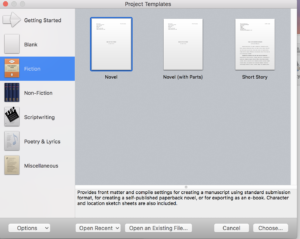
    You can create your own  to suit the way you work, but Scrivener comes complete with ready-made templates for various writing formats. For example, it has templates already loaded for a Novel, a Novel-With-Parts, General Non-Fiction, Non-Fiction with Sub-Heads, Research Papers, BBC Radio Play Format and many others.

    It also supplies basic templates for character sketches and setting sketches, that you can fill in and save with the project. Plus you can pull in any photos or media links as well as adding research, including websites etc. so you have it all in the same place for reference.

    Allows you to write in any order – in sections or scenes –  and move stuff around
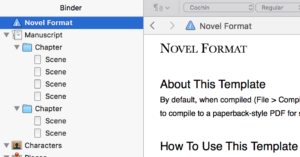
    Because the templates encourage you to write headed scenes or sections to be able to get the most out the tool, you can easily jump around when writing your manuscript as you wish, You can also move chapters, scenes and sections around with no trouble, just by dragging them to a different position. I personally find this preferable; I don’t tend to write larger projects in a linear way, so if I’ve set up my template the way I want it, I can write my scenes fairly randomly and first and move things and fill in any gaps later.

    Corkboard/Index Card view
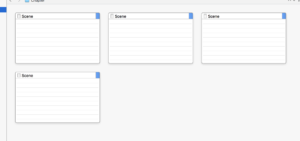
    Giving users the option to view their project at many levels, from the big-picture to the granular, is one of Scrivener’s very best features. You can view all your scenes onscreen as a full run-together manuscript, for instance; or you can view them on a virtual corkboard as index cards, to which you can add synopses, to be able to see the project and its components in its entirety. You also have an ‘Outline’ view, of the basic headings, and to which you can add any features you want to highlight, like word-counts etc.

    Colour-Coding
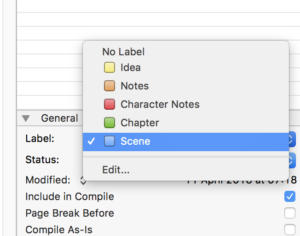
    You can colour code every section and also label it, as to whether it’s a chapter or a scene, a character note etc, whether it’s first, second or final draft, for example. That way, when you see the whole thing in overview, you can clearly keep track of what you have and what you’re going to want to keep and not keep when you export your final version.

    Composition Mode
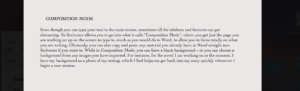
    Even though you can type your text in the main screen, sometimes all the sidebars and features can get distracting. So Scrivener allows you to go into what it calls “Composition Mode”, where you get just the page you are working on up on the screen to type in, much as you would do in Word, to allow you to focus totally on what you are writing. Obviously, you can also copy and paste any material you already have in Word straight into Scrivener if you want to. While in Composition Mode, you can have a black background – or you can choose a background from any images you have imported. For instance, for the novel I am working on at the moment, I have my background as a photo of my setting, which I find helps me get back into my story quickly whenever I begin a new session.

    Project Targets
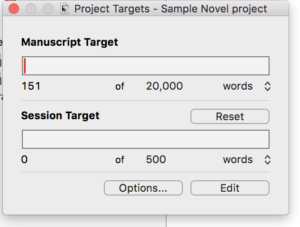
    Scrivener allows you to both set and track word-count targets, as well as set yourself deadlines. For example, you can set how long the full novel will be and the ultimate deadline date for finishing your current draft. You can also set what they call a “session target” – say, 1000 words every time – and it will track your progress toward that and also toward the overall goal, and tell you how many days you have left to achieve it.

    Export Tools
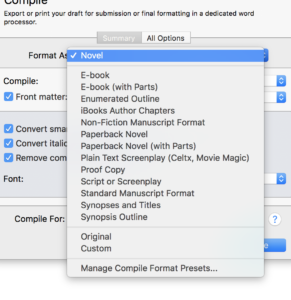
    Scrivener gives you loads of format options for exporting your final masterpiece. It is set up to show “front matter” (things like the title and your name and address if you are exporting into manuscript format, and title pages if you are exporting to paperback pdf format). Using its “Compile” feature, you can export into manuscript format, various e-book formats, paperback formats, pdf – you name it. You can even export it as a synopsis document based on the contents of your index cards.

    In short, having used Scrivener for a while now on my own projects, I can definitely see why other writers have fallen in love with it, and I use it on all of my bigger writing projects now. I can see also how it might not be for everyone though, depending on your requirements and way of working.

    Consider Scrivener if you:
    • Have a big project – like a novel – where you have a lot of material and scenes that you might want to move around, and you want to be able to view it all in different ways onscreen.
    • Are looking for a project-management tool for your writing
    • Write in random sections and want to be able to move things about later
    • Want somewhere to keep all the material together – like research, character sketches, photos, reference websites – as well as the actual drafts for a project
    • Need software that can export your work to numerous formats including manuscript, formatted print-ready PDF and e-book, which is great for self-publishers
    • Would like a one-stop-shop for all your writing needs around one project
    Don’t go for Scrivener if you:
    • Want a novel-writing system
    • Are looking mainly for a screenwriting formatting tool (Scrivener does have screenplay templates, but personally I’d use Final Draft for that kind of formatting)
    • Are an old-school, hands-on writer, and prefer to organise your work physically rather than onscreen e.g. with physical corkboards and index cards all around your room
    • Need to keep things simple. Scrivener’s great but because of all the little features it can feel a tad overwhelming at first.
     

  • My Journal Writing Creative Practice

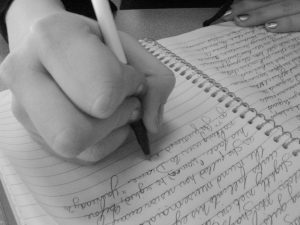
    I’ve had a regular journal habit since I was in my teens. Journaling is the way I work out problems, get things out of my system, discover what I really think about  the world. But my journal writing creative practice,  in the deliberate sense , has been a long time in development.

    At first, possibly inspired by Sue Townsend’s Adrian Mole, it was just the usual teenage diary. It mostly consisted of my day-to-day woes, major news headlines , friend and teacher sagas, longstanding and hopeless crushes. OK, so I didn’t write to the BBC as Adrian does with embarrassing frequency, but these ancient records of my former self are no less cringe-worthy.

    As I got older, I found I just couldn’t stop putting pen to paper in one form or another. At college, pre-internet and email, and when I travelled, and worked all over the world, I was well known among my friends  for my epic letter-writing. A 12-side probably unreadable letter from me was not at all unusual.   I also made the discovery that whenever had a problem to sort out, putting pen to paper and “writing through it” privately often seemed to lead to a solution. The process of journaling itself  seemed to have an almost magical effect, a path through any problem.  Little did I know then that these unofficial scribblings would turn out to be one of the most effective creative practices there is.

    Types of Journaling

    Obviously, there’s a distinction between “recording the external in detail” and “self-expression”. Both, of course, are hugely useful for fiction writers.

    Reportage 

    Detailed note-taking – about places, things, people, events. The aim is to capture exact detail, much like a photograph. It is factual, although the ways you record and what you pick up on can often be revealing about your own writing territory, preoccupations and truths.

    Try taking your notebook and pen to a particular place to observe and describe exactly what you see, what stands out to you. People-watch and eavesdrop and write down what you hear. Deliberately try to capture the essence of a particular place, or building, or backdrop, focusing on all the detail. You can journal for detail wherever you go, as long as you have something to write on and with.

    If you want to go deeper, there are some fantastic writing exercises you can do that directly tie the reportage of place to the personal; the exercises in Julia Cameron’s Right to Write, for example, or Merlin Coverley’s Psychogeography. (I’ll be reviewing both of these books soon.)

    Diarising

    Old-school and essentially linear, driven by date, just as I did as a teen.  Your thoughts about your day-to-day, news stories, anything on your mind. These entries can seem quite unremarkable at the time – they don’t have to be Art – but are often fascinating to look back on.

    I actually have in my possession my late grandmother’s diary from 1936,  which was the year she got married and moved  into the then newly-built house that she would live in for the rest of her life. It’s a pocket-sized burgundy-coloured Letts Diary, the endpapers printed with details about postal rates to the various countries across the-then vast British Empire. Train timetables up “to town” , measurements for hats, gloves and shoes. The entries probably seemed quite mundane to my grandmother, detailing her wedding preparations, her cinema dates with my grandfather, and their numerous spats. But these are interspersed with the news events of the day. The funeral of the King, the saga of Edward VII’s abdication crisis playing out on the wireless, and of course, ominous signs of the impending war.

    Diaries can provide important details and nuances about a particular time or era, either for ourselves or others. They can be great prompts for pieces of fictional work. It’s interesting, too, to note the formalities – what people choose to reveal and convey of themselves or exaggerate in their “official” diaries – and what they don’t.

    Project Journaling

     This is something I do regularly now. It involves gathering material and thoughts on specific projects or topic areas, and keeping them together in one place. I often keep entirely separate journals for different projects. These are great when you are in the research stage of a project, allowing you to make detailed descriptions of settings, characters and so on. You can write about related news stories, or your own personal thoughts about the issues and themes at hand. When I start a big project, I also like to track my project progress in a journal. The things I am thinking and worrying about at different stages, the problems to resolve, what I feel is succeeding and isn’t. Currently for example,  I am journaling about the novel I am working on.

    Free-writing

    A completely different type of journaling, freewriting is entirely about self-expression: whatever comes out, unedited will come out. The best forms of freewriting, I’ve found, rarely involve going back and looking at what you’ve written ; writing perfect descriptive prose is not the purpose, although you may find the odd gem if you do go back and look. I often use freewriting as a “warm up” before starting my writing proper, with the purpose being to completely turn off my inner editor. The most common form is to write for a certain number of minutes (it could be on a topic, from a prompt, starting from a first line etc) without stopping, and without taking the pen off the page.

    Morning Pages

    A form of daily freewriting, as advocated by Julia Cameron in The Artists Way and a very similar idea by Dorothea Brande before her.

    Essentially, it is three A4 pages of freewriting, to be done every morning as soon as you wake up, and it’s a central part of my creative practice. Again, you write without stopping, you write anything that comes into your head, and you don’t take your pen off the page until the three pages are done.. The purpose, again, is to completely turn off your inner editor and critic and reconnect you with your creativity. Which all sounds very woo, but I can honestly say that including regular morning pages in my daily practice substantially deepened and improved the quality of my work. I have about thirty notebooks now, all filled with my unreadable scrawl, most of which I’d never reread, but which I know are responsible for most of my writing successes so far.

    It’s certainly a method I can highly recommend.

  • Freedom: The Best Writing Tool Ever!

    Oh Freedom, I have found you again!

    I was delighted to see how one particular service has upgraded since my ancient  laptop gave up the ghost and with it, aside from the laptop itself, one of the best writing productivity tools I have ever had. Even if it was, in the early days back when I first learned of its existence, a little basic.

    So what was this miracle tool? What was I genuinely aghast to find had been removed from my desktop when I switched from my cranky old machine to my lovely sparkly new one?

    Well, sometimes the simplest things really are the best. It is:

    The ability to switch off my internet completely for fixed periods of time

    Yup! And that’s what this Freedom app thing does. Crazy, no? And yes, “freedom” really is the right word for it. I’d almost forgotten what that felt like.

    And alright, so you may be a whizz at self-mastery and able to focus like a pro for long stretches of time, but I, I’m afraid, with my little creative jump-about-everywhere brain that goes “ooh, look!” at anything that seems new and bright and shiny,  especially when I’m bored, am somewhat prone to distraction.

    I find when I have major work to do, or I am slogging through a difficult draft, or my writing speed is about half a word a minute or fewer, there are a million ways I can find to do – well, just about anything else online. For example, I can:

    • Go and browse through threads full of crazy and less crazy people on Reddit
    • Go and browse through other forums and/or post and get into an argument
    • Read loads of writer’s blogs
    • Look at other people’s lovely Instagram or Pinterest pics.
    • Watch clips of shows I love on Youtube
    • Browse for books I don’t need – but might one day
    • Googlestalk a celeb crush (or two, or five. Yes, I still have them). Plus all my also supposedly grown up friends’ crushes, just to check. Learn said crushes’ entire imdb histories plus those of all their co-stars. In case I need this info later
    • Read celeb gossip sites and find self saying things like “See? Knew all along that xxxxx was a wrong-un”
    • Play pointless online games. For hours. I’m not sure it counts as writing just because it’s a word-game. It definitely doesn’t if it’s e.g. Candy Crush
    • Check my Facebook feed
    • Check my Twitter feed
    • Check my emails
    • See what new stuff is out on Netflix. Ditto Amazon watch, BBC iplayer, iTunes Curzon Cinema…(should point out I am in the UK and do not own a TV). Start watching anything interesting. ‘Cos it’s art, innit? All art counts!
    • Read reviews of anything interesting. Books, movies, exhibitions….
    • Follow a random internet trail of general interestingness in the name of supposed “research”, except not really when you end up at Reddit again and three hours have gone by.

    Seriously, just being able to turn the frickin’ thing OFF for a bit has changed my writing life. I look back at my pre-internet days now (the net wasn’t even around back in days I was first a student) with a kind of stunned wonderment at a life free of all these  – devices and screens and “things” popping up all over the place. All the bloody time. Sure, I know it’s great to have easy access to all and any info at the hit of a button and I do love it but sometimes – it’s just too much. And it’s not what you need to get your writing done when you hit a rough spot, trust me.

    OK, then. What are the best things about Freedom?

    You can set the timing of the session where your access to the internet is blocked.

    So if, like me, you are a fan of timed focus sessions like, for instance, the Pomodoro Technique, you can just set up the exact number of minutes or hours you want to be offline – and away you go. When the session is over, you can get back online again quickly and with no fuss whatsoever.

    You can pre-book time slots for yourself to be offline

    A great new addition to the Freedom tool, this – the ability to set up your offline time slots in advance. You can also set them to recur. Get you, you super-organised little thing, you!

    You can choose what programmes and apps to block and not block

    What’s your poison? It might be the whole internet you need to free yourself from. It might just be your Facebook, or Twitter, or Reddit that distracts you when you need to be Doing Other Stuff. Freedom now gives you the option of choosing exactly which of your personal distractions you get to block – and when.

    You can choose which devices to block

    Yeah, yeah, I know that old trick. My laptop’s blocked – ah, but I have the urge and I just have to just check and read this thing right now and – oh yeah, so I can check my phone, I can check my iPad… Ha! Well, not so fast there, missy. With Freedom, you get to shut off all your devices if you need to, in order to keep yourself productive and focused for your session. Thus giving yourself – no excuses.

    So who’s it for?

    It’s worth taking a look at Freedom (which you can try out for free, btw) if:

    • You’re struggling with focus on your projects
    • You are getting distracted by net-surfing and the various online rabbit-holes you can dive into
    • You NEED to focus for fixed periods of time in order to get things done – but just aren’t and are wasting time
    • Other members of your household will have spectacular tantrums if you so much as hint at switching off everyone’s internet connection at the source for a while so you can “work”.

    Freedom mightn’t be necessary for you if:

    • You are already smugly self-disciplined and are never lured away from the task at hand by the tempting delights of the internet and all it has to offer
    • The idea of being removed from your constant stream of info, communications, and cute kitten pics fills you with existential dread. You couldn’t create without all that stuff flying around you, quite frankly.
    • You are the kind of person who “doesn’t believe in email” or “those bloody computer things” and still handwrites all your invoices and gets their personal secretary to type up anything that cannot be handwritten.

    So – if the former sounds like you and you want to get some serious work done – check this out for a sec  (yeah, instead of that argument going on on your Facebook timeline) – and give yourself the choice for once. Switch it off – and GET PRODUCTIVE!

    Whoop!

  • Review: The Artist’s Way

     The Artist’s Way   Julia Cameron

     The definitive book for reclaiming the creative self. Cameron’s 12-step programme (which follows AA methodology & structure) takes you on a week-by-week journey giving you the essential tools to reconnect you with your own creativity.  The most well-known of these are Morning Pages and Artist Dates.  Each chapter contains practical exercises for the week, and commentary on that week’s theme. It gives  Cameron’s guidance, and relevant biographical details of her personal journey of creative recovery after alcoholism and a harrowing public divorce (she was formerly married to director Martin Scorsese).

    I can certainly vouch for this one. Originally published in 1992,  it’s maintained its popularity for a reason. I found  the focus on personal creativity, even in the simplest ways, and doing morning pages first thing worked amazingly well and improved my writing tenfold, although the commentary and methodology may be a bit hippy-dippy for some. Having first read it more than a decade ago, I still do my Morning Pages religiously, and I’d recommend it for anyone struggling with writer’s block.

    Use if you:

    • Are struggling with writer’s block
    • Want to reconnect with your creative self
    • Would be keen to begin a regular creative practice but aren’t sure where to start
    • Are looking for something holistic with practical exercises
    • Have personal stuff to work out and process
    • Need  some creative self-care

    Don’t use if you:

    • Run for the hills at any mention of God or spirituality
    • Come out in hives at anything new-agey
    • Are looking for a writing craft or structure book
    • Want a how-to-write book or one that gives you tips about editing
    • Need something to help you with a specific writing project


  • Becoming A Writer – Dorothea Brande

    Becoming A Writer  Dorothea Brande


    I took, and I still take, the writing of fiction seriously. The importance of novels and short stories in our society is great. Fiction supplies the only philosophy that many readers know; it establishes their ethical, social, and material standards; it confirms them in their prejudices or opens their minds to a wider world.

    So writes Dorothea Brande in the introduction to her 1934 book, Becoming A Writer.

    It seems to me that there is comparatively little written in the now hundreds of writing books about the psychological aspects of “being a writer” – about things that hit many of us, like lack of confidence, for instance, or the underlying anxieties that lead to writers block. (See Writing, Pressure, and the Things We Don’t Talk About Enough for more on these issues.)

    And it’s interesting that, nearly 85 years after the book’s publication, despite the changes in technology , in spite of all the MFAs and books, the problems writers face are the same as they always were, and require the same basic solutions. These are what Becoming A Writer provides. It is essentially a guide to building for ourselves the good habits that form the foundation of a productive writing life.

    You can see how later creativity books like The Artist’s Way have been influenced by Brande’s thinking and exercises – Becoming A Writer can be considered a precursor to those. She uses the language of the then-new psychoanalytic approach, and writes a great deal about the power of the unconscious, as well as what would later be popularized by Mihaly Csikszentmihalyi as  “flow” .Her advice – she was a writing teacher – displays a  genuine psychological understanding  of writers and creative practice, particularly around building good habits and the sources of resistance.

    The purpose of the book is to ‘”train” the burgeoning writer via a series of musings and practical exercises, such as writing first thing in the morning, agreeing with yourself to write at set times, viewing yourself objectively as a character and so on,as well as exercising your “non-writing” self.. She takes what we would now call a “holistic” approach– but there’s certainly no “woo” about it.

    One particular strength for me is how the book encourages the writer to take ownership of their writing practice. Far too often, we look outside ourselves for the answers – to course qualifications, to self-declared ‘gurus’, to fixed interpretations of what constitutes good literature. Brande encourages quality, but wants her readers to know themselves well as people and what they think of the world and the big life questions,  so that they may strive for honesty in their writing, to familiarize themselves objectively with their own quirks, style, strengths and weaknesses and then use that to improve and build on that knowledge and skill.

    In all the books I’ve read on writing, I still don’t think I’ve found a guide to daily practice as common-sense and practical as this. In terms of content, it is every bit as relevant now as it would have been 80-odd years ago. As a result, I would highly recommend.

    Use if you need:

    • Guidance on building your regular writing practice
    • Practical exercises to build up good writing habits
    • An approach that encourages you to observe and take ownership of yourself as a writer, and that you can tailor to your own needs.